Available
Workforce operations in one connected system
We built Sentinel to bring job planning, workforce information and operational coordination into one web and mobile experience. It supports the people organising work as well as those receiving assignments, with shared access to jobs, availability, locations and activity history. The solution sits within our Asset of Things platform, connecting workforce operations with customer and asset information.
From a job brief to an assignment
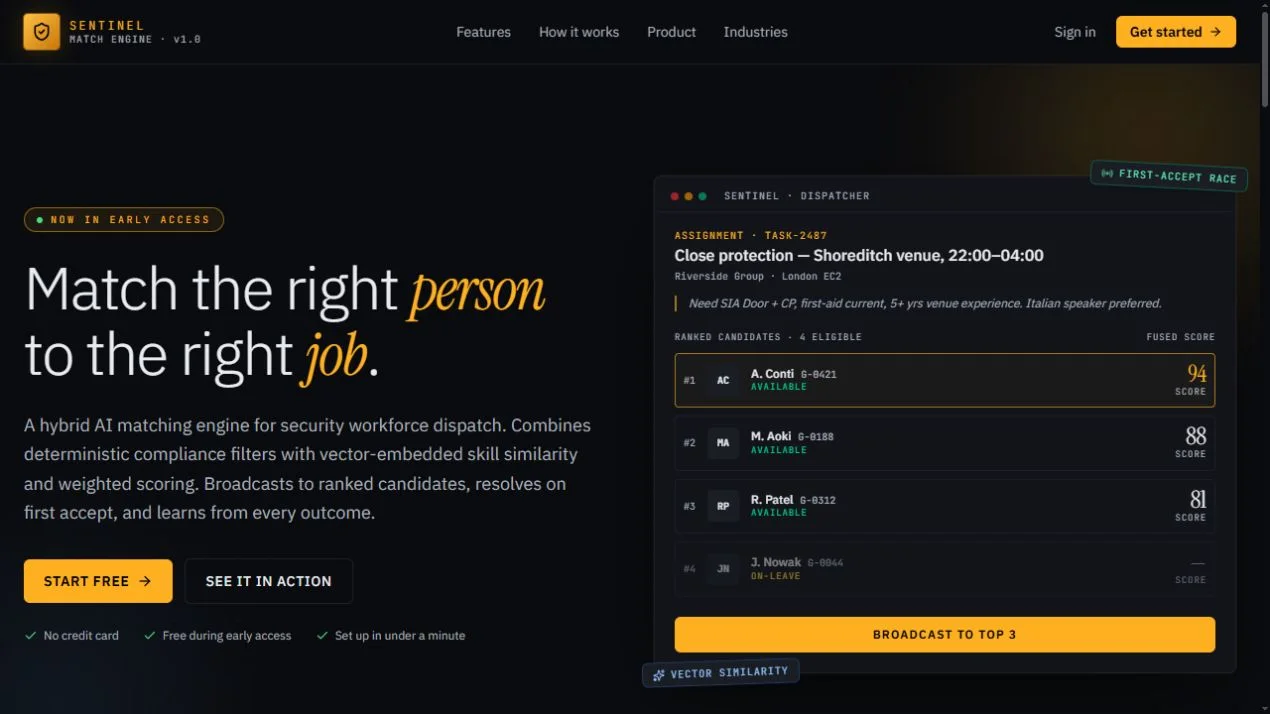
A useful dispatch workflow starts with a clear job: where it is, when it is needed and what the person doing it must be able to do. Sentinel brings job requirements and candidate information together so dispatchers can assess suitable people and manage assignments. Roster views, job status and activity history help teams follow the work after the initial decision.
A workspace for office and field teams
The web interface includes jobs, candidates, dispatch, rosters, customer information, assets, forms and geographic views. The companion mobile application brings operational workflows to people working away from a desk. This creates a shared platform for managing information across onsite and offsite teams rather than treating mobile work as a separate system.
AI assistance within operational workflows
We integrated an AI scheduling assistant into the Jobs and Roster workspaces. It is available when enabled by the platform configuration. The platform also exposes tools through the Model Context Protocol (MCP), allowing supported AI clients to work with the same operational services. Our approach connects AI to defined application capabilities and permissions rather than giving an assistant unrestricted system access.
Connected assets and camera intelligence
Sentinel also supports an asset-focused AI assistant for supported HikVision cameras. Operators can ask about device status, models, firmware and detection settings. Read operations require asset-view permissions; changes require asset-update permissions. The in-app assistant and external MCP clients use a shared tool layer, keeping integration logic in one place. Available actions depend on the connected equipment and configured services.
Technology and architecture
The web experience uses Next.js, React and TypeScript, with Tailwind CSS, TanStack Query, Leaflet maps and Recharts. The wider platform uses ASP.NET Core services and PostgreSQL, with shared authentication and permissions across applications. A modular architecture separates domain capabilities while allowing jobs, assets and customer workflows to work together.
Where Sentinel fits
Sentinel is suited to conversations about field service, security operations and other teams coordinating people, skills, locations and work. We can discuss the workflow, required integrations and configuration for your organisation, including where AI assistance would be useful and where an operator should remain in control.